new technology inventions| new computer technology 2017 | new technologies 2017 | latest technology gadgets | new technology 2018 | new technology 2017 in computer science | new technology 2020 | new technology in computer field

Post Top Ad

Wednesday, 24 July 2013

12:03

Reveiw: Celluon Epic Laser Keyboard


The Celluon Epic is a Bluetooth laser keyboard. The compact device projects a QWERTY keyboard onto most flat surfaces. (Glass tabletops being the exception) You can connect the Epic to vertically any device that supports Bluetooth keyboards including devices running iOS, Android, Windows Phone, and Blackberry 10. On the back of the device there is a charging port and pairing button. Once you have the Epic paired with your device it acts the same as any other keyboard.

For any keyboard the most important consideration is the typing experience that it provides. The virtual keyboard brightness is adjustable and is easy to see in most lighting conditions. Unfortunately the brightness does not automatically adjust based on ambient light. With each keystroke a beeping sound is played which can be turned down. The typing experience on the Epic is mediocre at best. Inadvertently activating the wrong key can make typing frustrating and tiring. Even if you are a touch typist you'll still need to look down on the laser keyboard as you type. The Epic is definitely not for the blind or visually impaired.

Compared to a conventional keyboard the Epic doesn't hold its own, but if you look as the Epic as a supplement to your on screen keyboard the Epic looks more promising. If you have trouble typing on your smartphone or tablet the compact Epic may be perfect for you. You can easily bring the Epic along in your pocket and then use it when you need to type a longer email or text.

The Epic is available directly from Celluon for $169.99 and through Amazon for a special price of $149.99. Click read more to view more photos of the Celluon Epic.


Monday, 15 July 2013

09:48

Bookshare Reaches 200,000 Accessible Downloadable Titles

Recently Bookshare's downloadable library of accessible ebooks reached 200,000 titles. The 200,000 mark comes just months after the 11th anniversary of the service. Bookshare books contain digital text and can be read with text-to-speech and synchronized highlighting. Text-to-speech paired with synchronized highlighting can help dyslexics with comprehension. Members can also read books on a refreshable braille display. As a result of funding from the United States Department of Education Office of Special Education Programs (OSEP) Bookshare is able to provide its services free to qualified U.S. students. For information on membership click here. Members are provided with software to read Bookshare books on their Mac or PC but  Bookshare books can also be read on many other devices including iOS devices using the  Read2Go or Voice Dream Reader app. An Android app called Go Read is also available.

Friday, 21 June 2013

08:50

Google's Advance Voice Search Comes to Chrome


Recently Google added advanced voice search to the Chrome browser. Google's advance voice search feature was previously only available for Android and iOS, but is now available on Mac and Windows. The feature is similar to Apple's Siri ,but works on your computer as well as mobile devices. To access the feature, navigate to Google using the Chrome browser and press the microphone icon to the right of the search bar. Then you can search by voice and Google will speak back select results. I have found the voice recognition to be very fast and accurate. One of the most notable features for struggling spellers is that you can ask how to spell a word and then Google will speak back the correct spelling. Google will also provide spoken responses for many other queries as well. Watch the above video to learn more.

Friday, 14 June 2013

18:11

iOS 7 Accessibility Overview: What We Know Now

This year iOS accessibility did not get the prime-time attention that it did during last year's WWDC Keynote, but iOS 7 still includes many new accessibility features. When iOS 7 launches in the fall, users of all abilities will find beneficial features. iOS 7 is still in beta so Apple can always add or remove features before the final release to the public. Through the Apple Keynote and other sources a number of accessibility features have been detailed. These new features will improve on current accessibility features such as VoiceOver, Guided Access, Speech Selection, Assistive Touch, and Zoom. This post will be updated as new information becomes available on iOS 7 accessibility.

Click read more to learn about iOS 7 accessibility.

Customize Captioning

from CultofMac.com

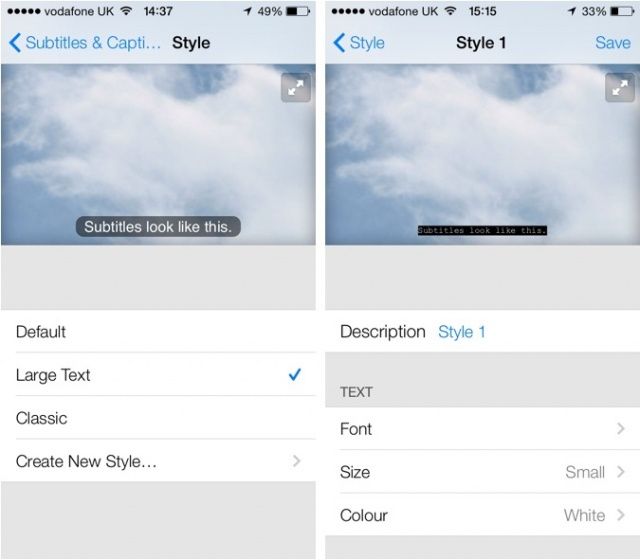
iOS 7 will also allow users customization the font and size of subtitles. Currently the subtitles are small and can be hard to read particularly on the iPhone and iPod touch. In iOS 7 the font, size, and color of subtitles can be changed.

Use Camera to Redeem iTunes Gift Card

from iDownloadblog

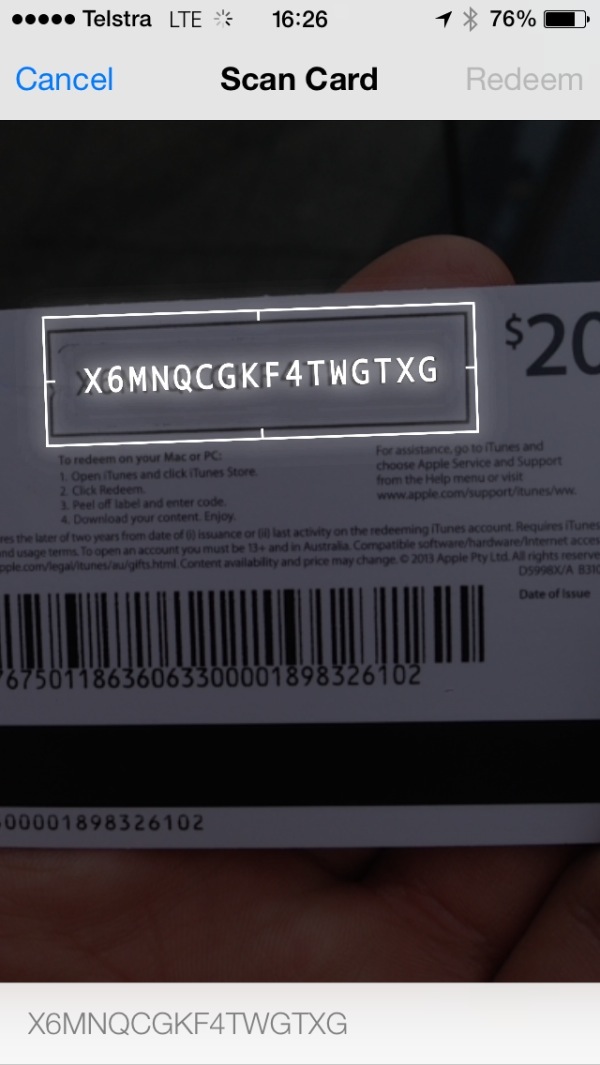
One of the coolest features for the blind and visually impaired in iOS 7 is the ability to redeem iTunes gift cards using the devices camera. This will allow users who cannot read the small codes printed on the back of iTunes gift cards to redeem their gift cards easily without assistance. This feature originally debut on iTunes 11 on the Mac.

Siri Improvements


Along with updated Siri functionality Apple has added multiple high quality text-to-speech voices. The voices are both male and female and sound much better than the previous Siri voice. It is not clear is these new voices will be available for VoiceOver and Speak Selection or exclusive to Siri.

Switch Control

from AppAdvice.com

According to AppAdvice iOS 7 beta 2 also includes Switch Control. Little is known about the feature but the name suggests that iOS 7 will allow a user to control their device through switches. These switches are designed for people with physical disabilities who may only be able to activate one or two large switches. A separate post on MacRumors say that iOS 7 will allow users to control their device with head movements. From the screenshot it appears that head movement could be part of Switch Control and be used to activate a switch but it is unclear at this time. Below is a video of Switch Control.


New APIs to Help Developers Build More Accessible Apps

Last year in iOS 6 Apple included Guided Access which could put the device in a single app mode. Guided Access was targeted for users with autism. This year iOS 7 will add a Guided Access API for developers. This feature will allow developers to build apps that integrate deeply with Guided Access to give users more control of Guided Access.

iOS 7 is also reported to include new APIs to allow developers to detect blinking and smiling which could help disabled users control their device. It has also been reported on 9to5mac that Apple will include a text-to-speech API which would allow developers to easily integrate text-to-speech into their app.

iOS 7 is looking like a great release for all iOS users including users with disabilities. Apple is likely to change feature until iOS 7 is released to the public in the fall.

Sunday, 9 June 2013

15:27

Reminder: Apple to Preview "The Future of iOS and OS X" Tomorrow


Apple's World Wide Developer Conference (WWDC) starts Monday June 10th. At the event Apple will detail "the future of iOS and OS X." Apple is a leader in integrated accessibility with their VoiceOver screen reader and numerous other accessibility features such as Guided Access, Speak Selection, Zoom, and Assistive Touch. That being said Apple still needs to improve their accessibility features to remain a leader. New accessibility features have routinely been added to new versions of iOS. Last year, Apple added Guided Access along with other accessibility improvements. A new version of iOS is exciting not only because of the cool mainstream features but the lesser known, but no less important accessibility features that make the devices usable for so many. Make sure to visit The Assistive Technology Blog after the Keynote for all the iOS 7 and OS X accessibility news.

In the meantime check out my iOS 7 Wish List video below.


Friday, 31 May 2013

15:03

Eyes-Free Typing App Fleksy Coming to Android With One Major Advantage Over iOS Version


Fleksy the eyes-free typing app that originally debuted for iOS is now available in beta for Android. Fleksy uses gestures and text prediction to allow users to type without looking a the screen. Fleksy can be extremely helpful for the blind and visually impaired and can dramatically increase typing speed people who cannot see the screen. Unlike the iOS version the Android version can replace the default keyboard and be used with any app. In iOS you cannot use Fleksy in an email app or with the messages app but on Android you can. Besides integration with Android apps the Android version will be similar to the iOS version. Android users can try the Fleksy by visiting the Fleksy Beta Google+ page.


Click read more below to view a video about Fleksy.


Tuesday, 14 May 2013

03:49

Prizmo 2.0 for iOS Released With Cool New Features


Prizmo 2.0 for iOS was just released in the App Store. Prizmo now works on the iPad as well as the iPhone and iPod Touch. The update includes many exciting new features. The original version of Prizmo included optical character recognition (OCR) but did not include the ability to scan documents to a PDF or text file. The PDF files are not just images but include searchable text. Prizmo 2.0 also allows users to export the documents to other apps.

To create a new document in Prizmo you can simply take a picture of multiple pages. Prizmo will automatically detect the edges of the page. In version 2.0 you no longer have to crop documents manually. Once you have captured all of the pages you can recognize the text of the document which is surprisingly fast and accurate. If the Prizmo does make a mistake you can edit the OCR zones or manually edit the text. After the text has been recognized you can email or export the document as a PDF or text document or read the text using built-in text-to-speech. The text is highlighted as it is read aloud which can be helpful for people with dyslexia  Unfortunately you can only read one page of the document at a time using the built-in text-to-speech. In addition, it is important to note that each text-to-speech voice costs $2.99.

Prizmo is still a great tool for quickly reading printed documents using text-to-speech and now is one of the best PDF scanning apps. Most PDF scanning apps such as Scanner Pro only make an image PDF with no text but Prizmo creates PDFs with searchable text.

Prizmo 2.0 includes a new feature to help blind and visually impaired users line-up a document. Because it would be virtually impossible for the blind to take a well aligned picture of a document with out assistance Prizmo voices directions through VoiceOver. If a user has VoiceOver turned on it will tell a blind or visually impaired user which direction to move their device in order to get the perfect shot.

Prizmo is on sale for $5.99 in the App Store. Click read more below to view screenshots of Prizmo 2.0.