new technology inventions| new computer technology 2017 | new technologies 2017 | latest technology gadgets | new technology 2018 | new technology 2017 in computer science | new technology 2020 | new technology in computer field

Post Top Ad

Tuesday, 15 October 2013

09:18

Apple Announces October 22th Event Likely to Foucs on new iPads and More


Today Apple sent invitations to members of the media for an October 22th event. The event comes just weeks after the release of the iPhone 5s and iPhone 5c. Rumors have suggested that the event will focus on an updated full sized iPad and an updated iPad mini. The full size iPad will likely feature a new design with smaller side bezels similar to the iPad mini's design. It is also possible that the new iPad models will include some of the new features found on Apple's latest iPhone possibly even the Touch ID finger print sensor. Of course all of this remains speculative until Apple officially confirms the details. If you are in the market for a new iPad it is difinitely recommended to wait and see what Apple will announce next Tuesday.

Saturday, 12 October 2013

04:56

Amazon Improves Accessibility Features of Kindle Fire Tablets


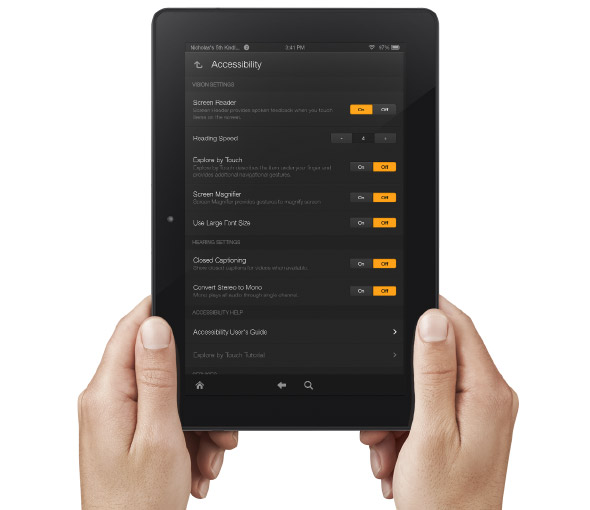
Amazon's newly announced Kindle Fire HD and Kindle Fire HDX include built in accessibility features. Historically, Amazon has been slow to make their Kindle products accessible. With the new accessible Kindle Fire and accessible Kindle app for iOS Amazon maybe turning a new page. That being said, Amazon still doesn't want to make their Kindle eReaders accessible and has requested an exemption from the FCC.

The new Android based Kindle Fire tablets includes accessibility features for the blind, low vision, hearing impaired, and mobility impairments. For the blind and visually impaired the Kindle Fire includes a screen reader that can describe what is taking place on screen. There is also Explore by Touch which allows users to use gestures to navigate items one-by-one. For low vision users the new Kindle Fire tablets include a screen magnifier which is activated by a triple tap on the screen. There are also large font size and high contrast options to benefit low vision users. For users with mobility challenges the Kindle Fire can be controlled with a Bluetooth keyboard. For dyslexic users the Kindle Fire includes Immersion Reading which synchronizes the text and audio version of a book. With Immersion Reading the text is highlighted as a professional reader speaks. It is important to note that to use Immersion Reading you must own both the Audible audio version and the Kindle ebook version which can be costly. While it is very exciting to see Amazon improving their accessibility features other tablets such as the iPad include more robust accessibility features.

The Kindle Fires also include a "Mayday" button that allows you to connect with technical support at anytime. The support person can then help walk you through using different functions of your tablet. This "Mayday" button could be useful especially for new tablet users.

The Kindle Fire is available in 7 and 8.9 inch form factors both sizes are available in HD or more powerful HDX variety. The cost ranges from $139 to $229 depending on the size and features. Click here to purchase from Amazon. Click read more below to view a video about Immersion Reading.


Wednesday, 9 October 2013

15:33

New in iOS 7: System Wide Large Type


Apple�s new mobile operating system is out for iPhone, iPad, and iPod touch. iOS 7 includes many useful features for all users regardless of ability. One feature that can benefit people with visual impairments is system wide large font. With this feature enabled a user can select a larger font size for use in all compatible apps; the only caveat being that app developers must build in support for this feature. Once widely implemented by app developers this feature will make it easy to have the perfect text size in all your apps. Instead of selecting a preferred font size in each app users will be able to choose a font size once for all their compatible apps.

To enable larger type go to settings > general > accessibility > larger type.

Large text in NYTimes App

Monday, 23 September 2013

15:41

Macally iKeyLT Keyboard: Full Sized Wired Keyboard for iPhone, iPad, and iPod Touch


The Macally iKeyLT is a full sized wired keyboard for iOS devices with the lightning connector. The iKeyLT version is designed for devices with the lightning connector while the iKey30 is designed for devices with the 30-pin connector. The keyboard has a solid and responsive feel. It has a standard layout and also includes a number of buttons specifically for iOS devices. For people who struggle to type on their iOS device the iKeyLT offers a solution. Unlike many other keyboard accessories, iKeyLT is a wired keyboard that plugs directly into the iPhone, iPad, or iPod Touch. In most situations Bluetooth keyboards are more convenient, but it some situations a wired keyboard does have advantages. With the wired keyboard there is no need for extra batteries, because the power is drawn from the iOS device itself. Also, in some testing environments wireless devices are not allowed. One downside is that because the keyboard plugs directly into the iPhone, iPad, or iPod Touch it is not possible to charge the iPad and type at the same time. This would only become an issue if the iPad was low on battery. The iKeyLT also comes with a external stand so you can position your  device for easy viewing while typing. Unfortunately the small stand does not attach or connect to the keyboard in anyway so it is easy to misplace.

The iKeyLT costs $60 and can be purchased directly from Macally. Click read more below to view more images of the iKeyLT.


Friday, 20 September 2013

22:50

New in iOS 7: Redeem iTunes Gift Cards with the Camera


Apple�s new mobile operating system for iPhone, iPad, and iPod Touch includes the ability to redeem iTunes gift cards with the camera instead of manually typing long codes. To redeem a gift card with the camera go to the iTunes Store, App Store, or iBooks Store and hit redeem at the bottom of the featured page. Then choose to redeem the gift card with the camera. You can use either the front facing or rear facing camera. To redeem the gift card just point the camera at the back of the gift card and the code is automatically redeemed. This new feature makes it possible for the blind and visually impaired to redeem gift cards without sighted assistance. Also, iOS 7 eliminates the need for sighted users to type in long and complicated codes. iOS 7 is available now for iPhone, iPad, and iPod Touch.

Thursday, 19 September 2013

18:16

New in iOS 7: Ask Siri to Turn on VoiceOver and other Accessibility Settings


iOS 7 is Apple�s new operating system for iPhone, iPad, and iPod Touch. iOS 7 includes a complete redesigned look and many new features. Siri in iOS 7 has learned some new tricks that can benefit users of VoiceOver and the other built in accessibility features that iOS offers. The feature allows you to ask Siri to turn on and off different accessibility settings using your voice. For example you can say, "turn on VoiceOver" and Siri will turn on VoiceOver in seconds. This feature will make iOS accessibility features easier to find and access. If a VoiceOver user is presented with an iOS device with VoiceOver turned off and triple click home disabled they could use this new feature to ask Siri to turn on VoiceOver. Besides accessibility settings Siri can also change other settings such as brightness, Bluetooth, and Wi-Fi. 

Wednesday, 18 September 2013

15:49

New in iOS 7: Detailed Look at Switch Control


Apple�s newly released iOS 7 includes many new features and improvements. iOS 7 runs on the iPhone, iPad, and iPod Touch. Users will notice changes as soon as they boot up their iOS 7 device for the first time. But this release allows a group of users to use iOS for the first time. Just as VoiceOver allowed the blind and visually impaired to access the iPhone, Switch Control now allows switch users to navigate and use their iOS device. Switch users are users who are only able to activate a few large buttons and who don�t have the ability to interact with the complexities of a touch screen. For example, a quadriplegic may be able to activate switches mounted on their wheelchair with their head. Switches come in all different sizes and configurations but they give  users who are unable to interact with the touch screen the ability to control their devices. 

Switch Control for iOS is similar to other switch interfaces, a cursor scans around the screen and when a switch is activated the user is given options to interact with that object or button. For example, a cursor will scroll through all the app icons on your home screen and when the switch is activated it will open the selected app.

Click read more to learn below to learn more about Switch Control on iOS 7.

Switches
Example of a switch
Switch Control can be used with external switches connected to the device via Bluetooth. Switch control can also use the front facing FaceTime camera to recognize a user�s head movements. A third option allows the entire touch display of your iOS device to be used as a switch. Once you have a switch you can choose its action. A switch can control scanning by controlling the cursor or can be used to control system functions such as activating Siri, notification center, or the app switcher.

Settings

Switch Control is extremely customizable to fit the needs of many different users. The settings can be accessed by going to Settings > General > Accessibility > Switch Control. The speed at which the cursor moves can be change for faster navigation or easier use. The cursor can also be set to pause on the first item. There are also switch stabilization settings to increase or decrease hold duration and also to ignore repeat. Switch Control can also speech items to the user as the cursor highlights items. The cursor size and color is also customizable. Similar to Assistive Touch Switch Control allows saved gestures to be saved and activated later.

Using Switch Control

A cursor highlights the elements or groups of elements on the screen. Activating the switch selects the group and then pressing the switch again activates an element. This process allows users to select apps from the home screen, keys on the keyboard, and other buttons. A secondary menu can also be activated with options specific to that element. The menu includes options to tap the element, scroll, activate saved and pre-set gestures, activate device functions such as volume, and shortcuts to change Switch Control settings. On elements such as volume sliders you are also given the option to decrement and increment. The gesture menu gives you the option to flick, pan, pinch, tap and hold, drag, drag and hold, double tap, freehand, and access saved gestures. Amazingly, these gestures can be precisely controlled through one switch by following on screen options. For scrollable list you can activate the �scroll� submenu.

Switch Control Compatibility with Third Party Apps

As with most accessibility features, support for Switch Control with third party apps unpredictable. Luckily, VoiceOver has laid the ground work for Switch Control. As I understand, Switch Control and VoiceOver use the same accessibility elements. This an app that works with VoiceOver will work with Switch Control and vice versa. This makes app developer�s jobs much easier.

Wrap-Up

Switch Control is one of many great new accessibility features in iOS 7. Switch Control will allow a whole new group of people (switch users) access to the iPhone, iPad, or iPod Touch. Like all of Apple�s accessibility features Switch Control is available on all iOS 7 devices and works out-of-the-box.